Blueprints for a Home Security Stack
Designing the Architecture of a Home Security Operations Platform
NOTE: In Progress
As discussed in the introduction to this series, a network can’t really be properly secured unless we can see and understand what’s happening withins. The purpose of this project is to increase visibility into my home network, collect telemetry, analyze data, view information/alerts on a centralized dashboard, and respond to threats.1 If you haven’t yet read that article, please take a look to get a good handle on the background of this home-lab and the motivation for taking on a project like this. The purpose of this post is to design the architecture and make selections on hardware/software all while discussing the reasoning for decisions through lenses of security, efficiency, risks/mitigations, benefits, and cost. As much as I hate this phrase, this post will be a “living document” that I’ll periodically update as progress is made on the project.
**This Post is the home-base for an ongoing Endeavor to more deeply understand the engineering behind cybersecurity
Piling shit on in the most organized and elegant way possible.
Following is a diagram showing a very abstracted and high level flow that the system will follow:
Where We Left Off: High-Level System Flow
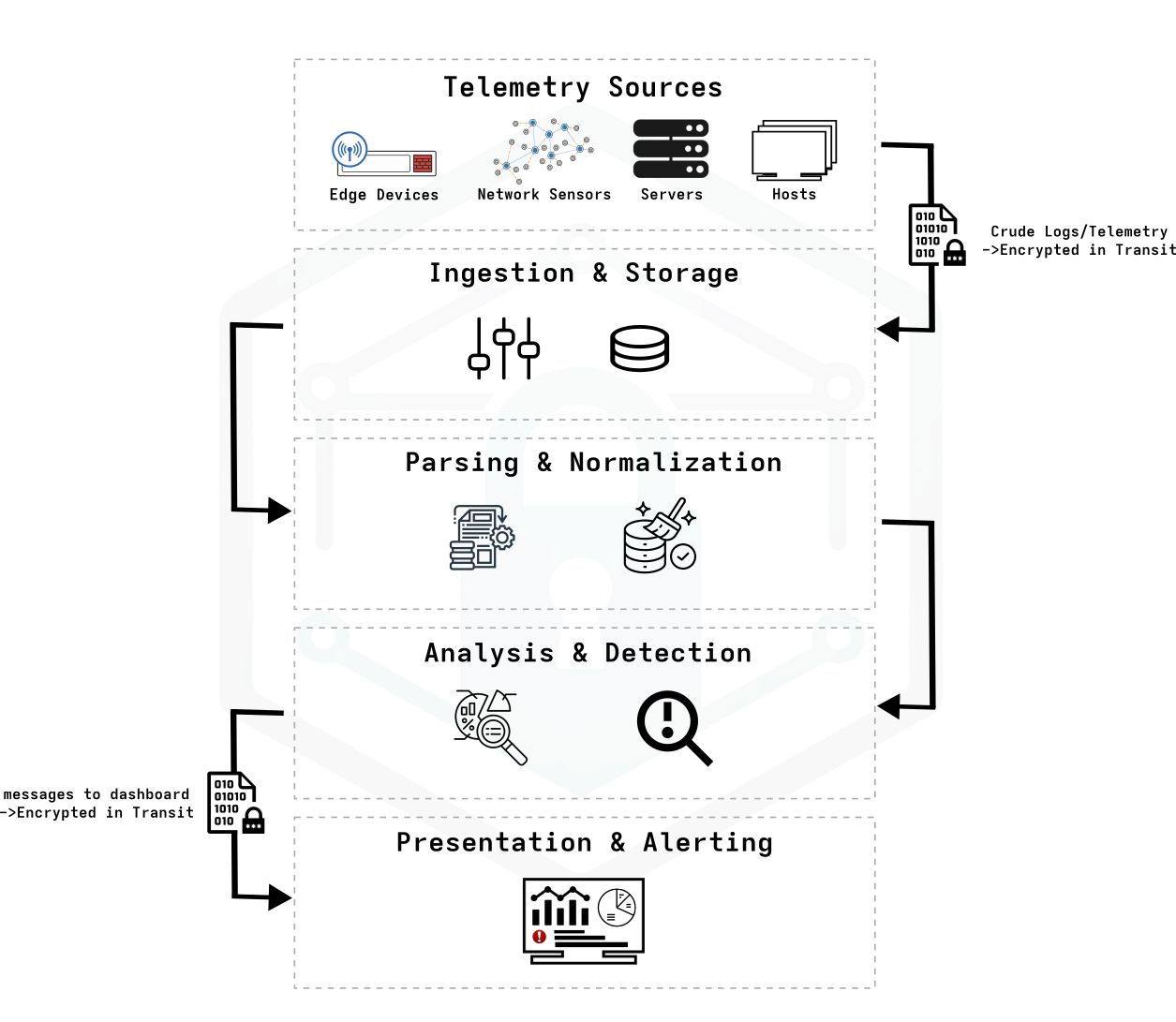
It’s important to note that there is not a 1:1 correspondence of layers in this abstract system flow and any specific software solution or tool that we’ll be using. Some layers may need only one tool and others might need several. Some tools might even solve multiple layers or bits of a few different layers. The one thing that is abundantly clear here is that there isn’t going to be a simple “plug and play” solution that will solve everything here. We’re going to have to build our own solution of modular components that work together. We’ll go through each one of these layers, explain the purpose, and go over some software solutions that can fulfill our needs. But first, I want to discuss the system at the levels of hardware, networking, and virtualization.
Infrastructure
One thing we know is that we’ll be using multiple software solutions integrated together to form a modular solution.2 The obvious path here is to adhere to this ethos and create an infrastructure that mirrors the modularity of the system running on it. This means we’re looking to implement an architecture with the ability to add and remove hardware and software components with relative ease.
Proxmox
Proxmox is really popular in the home-labbing world. It’s touted as a “complete open-source platform for enterprise virtualization”. It has a number of benefits and fits really well into this project for several reasons:
- Proxmox is a Type-1 Hypervisor. This means that virtual machines run directly on bare-metal hardware, offering a performance advantage over Type-2 Hypervisors like VirtualBox or VMware. I’m working with second-hand finds here, so I’ll want every little improvement I can muster.
- Proxmox supports both virtual machines with KVM and containers using LXC.
- Management of Proxmox is done through a single web interface.
- Proxmox works well with ZFS as its filesystem. This means:
- Data integrity checking (checksums)
- Native snapshots and rollbacks
- Easy replication
- Proxmox allows for high availability (HA) clustering and live migration3
- Proxmox has software defined networking with VLAN tagging and bridges and much more. This should make it relatively simple to integrate different VMs into my already segmented network. Additionally, it can allow me to create sandboxed environments, mirror traffic, and more.
- PCIe/GPU passthrough can make it easy to experiment with CUDA-based anomaly detection using advanced data analysis and machine learning techniques.
- Proxmox has built-in VM backups, scheduled backups, storage replication, and remote backups amongst many other data retention and disaster recovery tools.
The idea here is to create a cluster of virtual machines that can work together or different tasks to achieve a functional security environment. I’m going to need some hardware to host all of this.
Hardware
This project has a relatively small budget. I can afford a bit more hardware on top of what I have, but there are limitations in (1) current hardware, (2) what can be purchased to add in to the mix, and (3) the network throughput between nodes. Everything is limited to 1GbE network throughput due to the current router and switches I have in use. Uprgading it would be a total overhaul of my rack. While it’s something I hope for in the future, it’s not in the cards right now.
Hardware Currently in Use
- 1 GbE x86 hardware running OPNsense as the layer 3 router/firewall
- 8 port 1 GbE POE managed switch
- 5 port 1 GbE unmanaged switch
- Wireless Access Point
- Frankenstein NAS from a maxed out old Dell Optiplex 780
Extra (Useful) Hardware I Have Lying Around
- Old gaming laptop
- Predator Triton 500
- 1 TB NVMe
- 32 GB DDR4
- 10th Gen Intel Core i7
- NVIDIA GeForce RTX 2080 Super
- An embarrassing amount of stickers
- Extra drives
- 2 * 1 TB NVMe
- Several 1 TB 2.5” HDDs
Recently Acquired Hardware
- Proxmox Nodes
- 4 * Lenovo ThinkCentre M710q Mini PCs
- 256 GB NVMe
- 16 GB DDR4
- 7th Gen Intel Core i5-7500T
- 4 * Lenovo ThinkCentre M710q Mini PCs
- 8 port, 1 GbE managed switch
- 24 port patch panel (to replace 12-port patch panel)
Proposed Physical Infrastructure
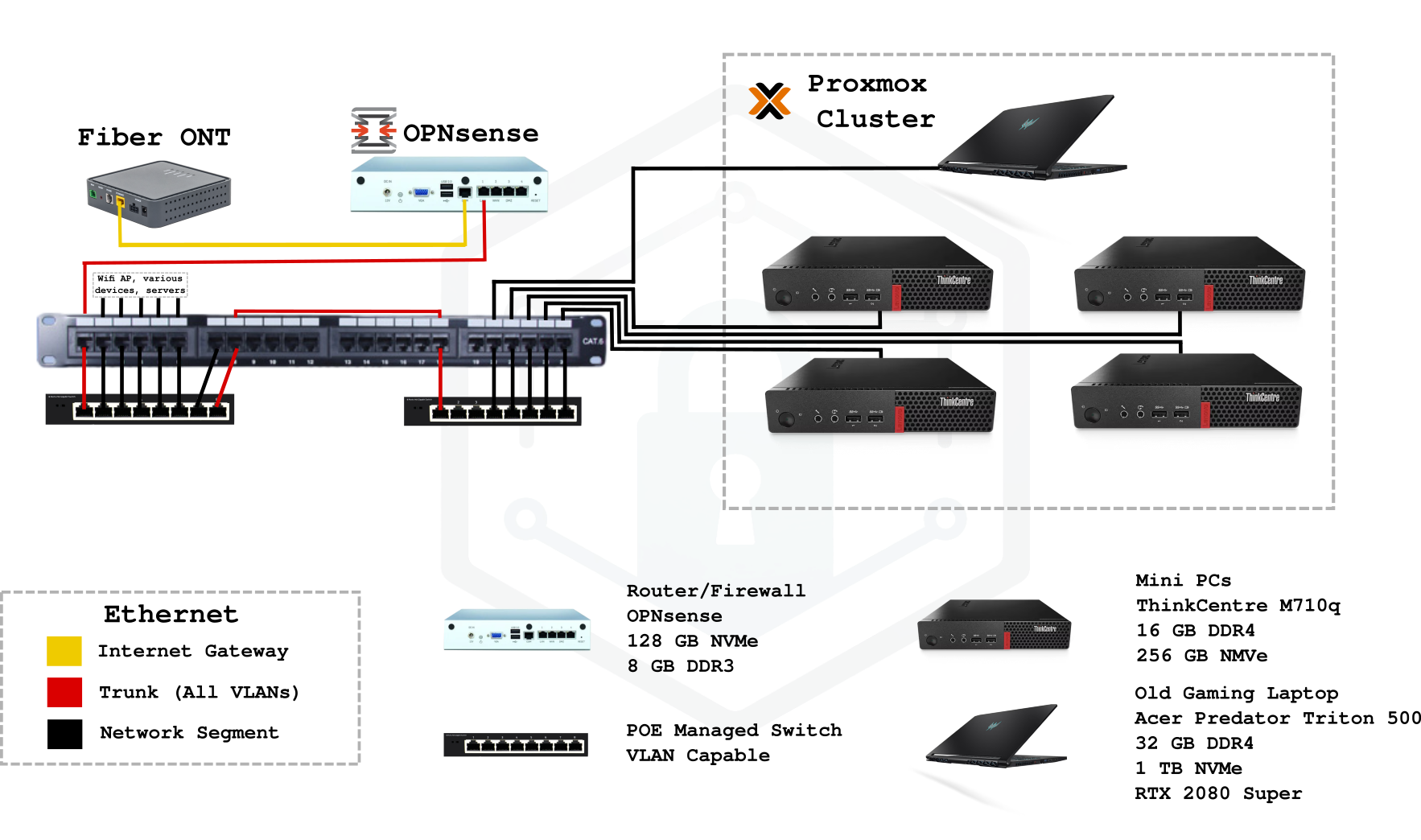
The main idea here is to set myself up for future projects with the hardware I’ve already set up. Right away, my first thought is that the gaming laptop will be handy once I get to a stage where I want to automate some of the analytics. The GPU will serve nicely to speed up some calculations and I can always keep it in my back pocket to run a simple ML model to flag suspicious behavior. The mini PCs should work well to handle much of the other tasks like log storage, replication, net-flow collection, and hosting the dashboard.
The plan is to eventually set the proxmox cluster up as a quorum for fault tolerance with live migration using Proxmox’s Ceph, but I’m limited by my disk space and network throughput right now. With the currently proposed architecture, I still get some fault tolerance with replication and can always make the upgrades to add in Ceph at a later time. I’ve also considered running the entire cluster off shared storage to enable live migration, but that introduces a single point of failure, so I would need some sort of redundancy on the NAS as well. With the costs of silicon in 2026 (sigh), it may be some time before those upgrades are realistic.
Mapping Dependencies for Strategic Direction
With complex systems like the one proposed here, a web of dependencies begins to form. Some parts of this project entirely rely on the existence (and proper functioning) of other parts. This implies that there needs to be a specific order in which we implement each feature. This project needs to be approached incrementally to ensure that each modular component added to the system (1) functions properly, (2) provides additional context/capabilities, and (3) can be expanded upon. To ensure we get the order right, we’ll want to map out our dependencies. If we can find the root of that dependency map–the component that does not depend on any of the others–we’ll have the first component that needs to be installed and configured.
If we look back at the High Level System Flow Diagram from the beginning of this article, it does an okay job of mapping dependencies if you squint and tilt your head. We’ll use this to help us build a more focused directed acyclic graph (DAG) to map our dependencies.
DAG here
Basic Functioning Network
It should probably go without saying, but I’m going to say it anyway: In order to implement a modular security operations platform on a network, the network itself should be in good working order. There needs to be a solid foundational infrastructure. This means DNS, DHCP, NAT, NTP, Static IPs, firewall rules, segmentation, routing, and so on should all be functioning as intended. A well functioning network is the root dependency. If we try to build something like this on top of a half-functioning network that’s barely scraping by or a network without control or visibility of these components, then we’re setting ourselves up for failure. A solid foundation is not optional. That’s non-negotiable.
A full network audit is required here if you want to ensure you’re checking all the boxes.
Network Time
I think a lot of people underestimate how important time is when it comes to both computation and record keeping. If the need to investigate network activity ever arises (that’s the entire point of this project, so it should), then the process will be much more straightforward with an exact time sync between all the devices on the network. This is especially important for clusters like the Proxmox one we plan on implementing. If time is off between machines, it will be much more difficult to correctly determine the order with which events occurred, especially across multiple systems. Without accurate timekeeping, logs are basically rendered meaningless in a forensic sense.
Get everything properly synced before even considering aggregating & correlating data from distributed sources!
DNS & DHCP
Domain Name Service (DNS) and Dynamic Host Configuration Protocol (DHCP) being properly set up can easily be overlooked, but they’re both a core part of a secure network.
write about different historical weaknesses and resolutions with both DNS and DHCP here
Each component in the system should each meet the following criteria at a bare minimum:
- Outputs what it is asked and nothing more
- Has appropriate permissions, access controls, and authentication protocols
- Follows the rule of least privilege
Every decision made during the planning and execution of this project heavily weigh privacy and ethics as vital and decisive factors.↩︎
The main goal is to get something running here that’s greater than the sum of its parts.↩︎
We’re not going to set up Ceph or even NFS with a NAS for live migration. It’s an awesome facet of Proxmox and will likely be an addition in the future, but being limited to 1GbE throughput and lacking a performant NAS with a lot of nvme drives is going to limit how well the system works. Additionally, using a single NAS means that machine is a single point of failure for the entire system.↩︎